Why your sewing machine needle hits the plate and how to fix it
A sewing machine needle hitting the plate usually happens because the needle is bent, installed wrongly, or the needle plate is misaligned. Check needle position, replace a bent needle with the correct size, and adjust the plate screws carefully to fix it.
On this page (8 sections)
Part of our guide on sewing machine skipping stitches
Key figures
- Needle size
- 80/12 EU/US
- Typical needle bend
- visible to naked eye
- Needle plate screw torque
- hand-tight plus 1/8 turn
- Broken needle risk
- high if bent needle used
- Presser foot position
- up when threading
The short version
- Bent or wrong needles cause most needle-to-plate crashes.
- Always install needles with the flat side facing the right direction.
- Misaligned needle plates can push needles off track.
- Regularly clean lint and re-thread with presser foot up to avoid jams.
- Use a needle gauge to ensure correct needle size and alignment.
Why does the needle hit the plate
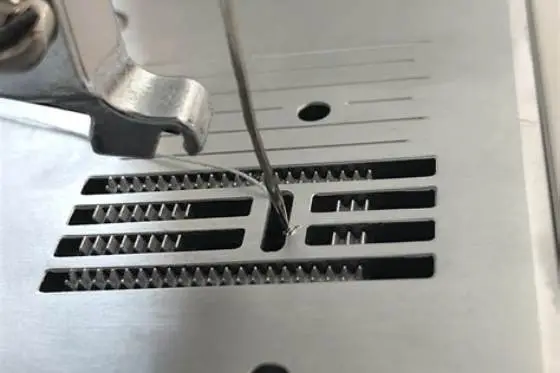
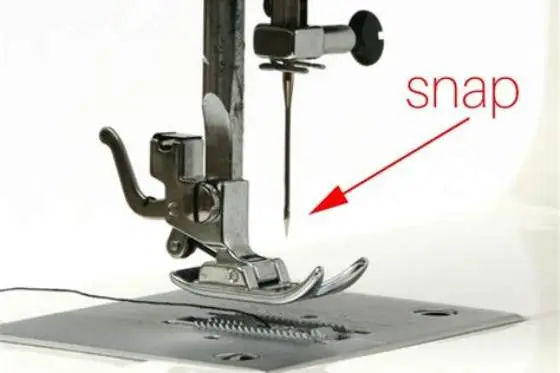
Needle hitting the needle plate happens mainly because the needle is bent, installed wrong, or the needle plate isn’t aligned with the needle’s path. Even a slight bend can push the needle into the plate.
Another reason is incorrect needle size or type, causing the needle’s eye or shaft to collide with the plate hole edges. Dirt or lint build-up can also force the needle off course.
If the needle bar or needle plate screws are loose, the needle path shifts, hitting the plate. A damaged or worn needle plate can also cause the needle to catch or hit metal edges.
How to check needle position
The needle must be installed with the flat side facing the correct direction, usually the back. Check your machine manual for specifics. We go through jammed sewing machine handwheel step by step elsewhere on the site.
Look at the needle with the presser foot up and the needle bar fully lowered. The needle tip should line up straight with the needle plate hole.
If the needle swings forward or backward, or moves sideways, it’s either bent, installed incorrectly, or the needle bar timing is off, requiring service.
If the needle swings when lowered, check if the needle bar itself wobbles. Gently hold the needle bar and try to move it side to side. Any play means the bar is loose or bent, affecting needle path. We go through checking needle size and fit step by step elsewhere on the site.
Try a test stitch on scrap fabric after installing the needle. If the needle still hits the plate, check if the needle is the correct type. A stretch needle, for example, has a slightly different shape than a universal one, and using the wrong type can cause hitting.
- Raise the presser foot and needle bar.
- Loosen the needle clamp screw and pull the needle straight down.
- Install a new needle with the flat side facing the right way and push it up fully.
- Tighten the screw firmly but avoid over-tightening.
- Manually turn the handwheel to lower the needle slowly; watch if it lines up with the plate hole.
How to align or replace the needle
Replace bent or dull needles immediately with the right size and type for your fabric and machine. For example, a 80/12 sharp needle suits medium-weight woven fabrics.
Install the needle with the flat side facing the correct way and pushed up fully to avoid hitting the plate. Before you commit to anything, it is worth looking at sewing machine making loud noise.
If the needle bar is loose or the needle moves out of alignment, tighten the needle clamp screw securely. Over time, screws can loosen from vibration.
If replacing needles doesn’t fix hitting, needle bar timing may be off, which needs professional service.
Sometimes a needle that looks straight still causes hitting. Hold it up to a light source and rotate slowly. A twisted needle can catch the plate edges even if it appears straight.
If you find the needle bar clamp loose, tightening it can stop hitting. Use a small screwdriver to snug the clamp screw but avoid over-tightening or stripping it.
After replacing the needle, sew a few slow stitches and watch the needle movement closely. If it brushes the plate edges, stop and recheck needle installation or plate alignment.
- Remove the old needle by loosening the clamp screw.
- Select a new needle of correct size and type.
- Insert needle flat side correctly and push it all the way up.
- Tighten the clamp screw firmly.
- Test slow manual stitching to confirm no hitting.
A bent or wrongly installed needle is the top reason your sewing machine needle hits the plate and breaks—fix it yourself safely.
How to check and adjust needle plate
Needle plates are held by small screws that can come loose and shift plate position, causing the needle to hit metal edges.
Remove the needle plate by unscrewing carefully, clean lint underneath, then reattach lightly before testing needle clearance.
Adjust plate so the needle passes cleanly through the hole without touching edges. Tighten screws hand-tight plus a small turn.
If the plate is scratched or bent, replace it for smooth needle movement.
Needle plates come in different sizes for specific machines and types of sewing. Using the wrong plate can cause the needle to hit the metal edges.
If your needle plate has grooves from years of use, the needle can catch there and break. Polishing the plate with fine sandpaper smooths these edges and can prevent hitting.
If adjusting the plate doesn't solve hitting, check the needle bar timing. The needle must enter the hole at the exact moment the hook picks up the thread. Timing off by even a millimeter can cause hitting.
- Turn off the machine and unplug it.
- Remove the needle plate screws with a screwdriver.
- Lift off the needle plate and clean lint and debris.
- Inspect the plate for damage like grooves or bends.
- Reinstall plate and tighten screws firmly but avoid overtightening.
- Manually lower needle to check clearance.
How to avoid breaking needles inside the machine
Broken needles inside the machine usually happen when needles hit the plate or bobbin case due to wrong needle size, bent needle, or misalignment.
Always use the needle recommended for your machine and fabric type. For thick fabrics, use a stronger needle like 90/14.
Re-thread the machine with the presser foot up to avoid thread tension pulling the needle sideways.
Keep the bobbin and bobbin case clean and correctly inserted to avoid needle clashes.
If your machine clunks or jams, stop immediately and check needle and plate alignment.
- Needle choice: correct size and type for fabric
- Installation: flat side correct, pushed fully up
- Threading: presser foot up to avoid tension issues
- Cleaning: lint removal from bobbin and plate area
- Maintenance: tighten screws regularly
Why your sewing machine needle hits the plate
Needle hitting the plate is often from needle bending during sewing or incorrect installation. The needle’s flat side must face the right direction and be pushed up fully.
Needles that are too thick or thin for your machine’s needle bar can also cause collisions.
Misaligned needle bars, loose needle plates, or damaged plates are common mechanical causes.
Check these areas carefully to avoid needle breaking and machine damage.
Still wondering?
Can a bent needle still be used safely?
No, a bent needle is more likely to break while sewing and can damage the machine. Replace it immediately.
How can I tell if the needle plate is misaligned?
Remove the needle plate screws and check if the plate moves or shifts easily. Also, look for needle contact with plate edges while manually lowering the needle.
What needle size should I use to avoid hitting the plate?
Use the size recommended by your machine manual, commonly 80/12 for most home machines. Too large or small needles cause hitting issues.
Can threading the machine with the presser foot down cause needle hitting?
Yes, threading with the presser foot down keeps tension on the thread, pulling the needle sideways and risking plate hitting.
When should I take my sewing machine to a repair shop?
If needle hits persist after replacing needles and adjusting the plate, or if needle bar timing seems off, a professional service is needed.