Why your sewing machine knocks loudly and what to check first
A sewing machine makes a loud knocking noise usually because the needle is bent, the bobbin isn't seated, lint has built up in the hook area, or the timing is off. Check the needle, bobbin, and lint in that order. Stop and service if noises persist after cleaning.
On this page (8 sections)
- The short version
- What clunking, knocking, grinding, and squealing noises mean
- Needle checks: bent, wrong size, not fully seated, hitting throat plate
- Bobbin and hook area: lint, thread nest, bobbin not seated, burr on hook
- Rethread, reseat bobbin, clean feed dogs and hook race in the right order
- When the noise means timing or hook damage and you should stop and get service
- What not to oil and how to test quietly after each fix
- Still wondering?
Part of our guide on adjusting feed pressure
Key figures
- Typical needle size
- 80/12 EU/US
- Bobbin seat check
- must be flush
- Lint cleaning interval
- every 5-8 hours sewing
- Noise from timing
- rhythmic knock
- Needle bend effect
- sharp knock
- Hook burr cause
- grinding noise
The short version
- Bent or incorrectly seated needles cause sharp knocks.
- Bobbin issues create clunks or grinding sounds.
- Lint buildup in hook or feed dogs causes noisy interference.
- Timing problems cause rhythmic knocking needing professional repair.
- Always clean and rethread before suspecting mechanical damage.
What clunking, knocking, grinding, and squealing noises mean
Different noises from your sewing machine hint at specific problems. A sharp clunk or knock often signals a problem with the needle or bobbin area. Grinding sounds usually mean a burr or damage inside the hook or gear mechanism.
Squealing tends to come from motor strain or a dry, improperly lubricated machine. Note when the sound happens: while lowering the needle, during stitching, or when turning the handwheel. This timing helps pinpoint the source accurately.
Pay attention if the knocking is rhythmic and consistent. That typically flags timing issues between the hook and needle. If the sound is random or only during threading, needle or bobbin issues are more likely.
| Noise Type | Likely Source | When It Occurs |
|---|---|---|
| Clunk/Knock | Bent needle or bobbin seating | Lowering needle or stitching start |
| Grinding | Burr on hook or damaged gear | During stitching or handwheel turn |
| Squealing | Motor strain or lubrication problem | Motor running or high speed |
| Rhythmic knocking | Timing misalignment | Continuous stitching |
Needle checks: bent, wrong size, not fully seated, hitting throat plate
A bent needle is the most common cause of knocking noises. Even a subtle bend causes the needle to impact the metal throat plate, producing a sharp knock. There is more on how to oil a sewing machine in a separate guide.
Check needle size next. Using the wrong needle for your machine or fabric can cause it to wobble or hit the throat plate. Most home machines use size 80/12 needles for medium-weight fabrics.
Make sure the needle is fully seated and tightened. A loosely installed needle moves with the hook timing and can knock or click against other parts.
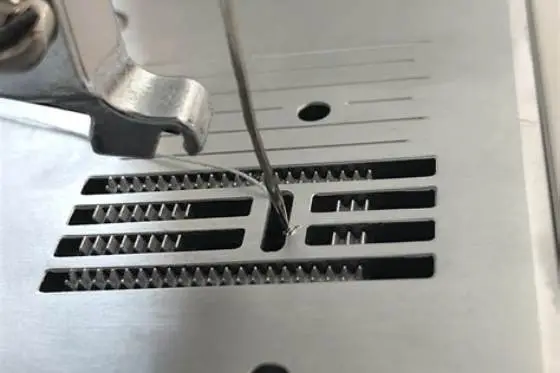
If the needle is hitting the throat plate, you'll often see visible marks or small metal burrs on the plate. Replace the needle and test again carefully. It helps to understand machine needle hits plate before going further.
- Turn off and unplug the machine.
- Raise the needle to its highest position using the handwheel.
- Loosen and remove the needle; inspect for bends by rolling it on a flat surface.
- Replace with a straight needle of the correct size and fully tighten it.
- Lower the needle slowly by hand to check if it hits the throat plate.

SCHMETZ Universal (130/705 H) Household Sewing Machine Needles
Quiets knocking and rattling from a bent or wrong-size needle by fitting the correct 80/12 size your machine expects.
Bobbin and hook area: lint, thread nest, bobbin not seated, burr on hook
Lint and thread collect in the bobbin case and hook area rapidly. This buildup disrupts the hook’s smooth rotation, causing knocks or grinding noises.
Check the bobbin is seated properly and spins freely. If it’s loose or jammed, you’ll hear clunks each time the hook catches it.
Inspect the hook for burrs or damage. A rough or damaged hook makes grinding noises and risks thread breakage or skipped stitches. The other half of this decision is removing lint buildup.
Clean this area first by removing lint with a small brush or compressed air. Reseating the bobbin usually fixes knocking from this zone.
A correct bobbin size matters more than most beginners expect, so check the manual for the exact class your machine takes. A Class 15 bobbin in a Class 66 housing sits about 1 to 2 mm too tall and knocks once per hook rotation. You will hear a single dull thud, and the thread may loop underneath instead of forming a stitch. The right class stops the thud.
A burr on the hook tip feels like a tiny catch when you run a fingertip or cotton swab around its edge. The thread snags at that spot, so you get a sharp grind and shredded thread every 10 to 20 stitches. Hold the hook still and turn the handwheel slowly, and you will feel the resistance at the same point each time. That repeat point tells you the hook needs polishing or replacement, not just cleaning.
- Remove the needle plate to access the bobbin area.
- Take out the bobbin and check for lint or thread nests.
- Clean all lint using a lint brush or canned air.
- Check bobbin tension and seating, reinsert properly.
- Spin the bobbin by hand to verify freedom.
A sharp knocking sewing machine noise almost always links to needle or bobbin issues, which you can check first at home before expensive repairs.
Rethread, reseat bobbin, clean feed dogs and hook race in the right order
After checking needle and bobbin, rethread the machine completely. This resets thread paths and often resolves noises caused by thread catching.
Always raise the presser foot before threading to ensure the tension discs open fully. Thread passing under tension incorrectly can cause noises and stitching faults.
Clean the feed dogs and hook race during this process. Lint under the feed dogs disrupts fabric feed and can cause noise and skipped stitches.
The right order: needle check, bobbin and hook cleaning, full rethread with presser foot up, then a test stitch. After each step, test by turning the handwheel slowly and listening.
- Raise the presser foot and remove old thread.
- Clean feed dogs and hook race with a lint brush.
- Reseat and secure the bobbin.
- Rethread both upper thread and bobbin thread correctly.
- Test stitch slowly, listening for knocking or grinding.
When the noise means timing or hook damage and you should stop and get service
If knocking continues despite checking needle, bobbin, lint, and rethreading, the machine’s timing may be off. Timing means the hook and needle move in sync to catch and form stitches properly.
Timing issues produce a rhythmic knock with every stitch cycle. It’s often a loud, steady clunk not fixed by cleaning or new needles.
Damage to the hook or gear teeth also causes grinding or repetitive knocks. This is beyond home fixes and risks further damage if ignored.
Stop using the machine if timing or hook damage is suspected. Continuing can harm the motor or require costly repairs.
You can confirm a timing slip without opening the gearbox, so try this handwheel test first. Set a new 80/12 needle, turn the handwheel until the needle rises 2 to 3 mm from its lowest point, and watch the hook tip. The tip should pass just behind the scarf, about 0.05 to 0.1 mm away, and a gap you can see means timing has shifted. If you see that gap, stop and book service, because forced sewing bends the hook and doubles the repair.
A rhythmic knock that lands once per stitch, even with no fabric or thread, points to gear or hook damage, not lint. Listen for 10 slow handwheel turns, count the knocks, and if you get 10 knocks you have a once-per-cycle hit. That pattern will not clear with cleaning, and each extra minute of running can chip a tooth or score the race. Unplug the machine and note when the knock occurs, so the technician hears exactly the same test you did.
What not to oil and how to test quietly after each fix
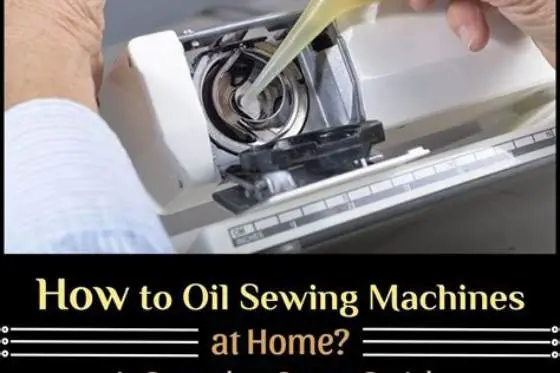
Only oil sewing machines where the manual specifies. Avoid adding oil to the bobbin case or hook area if the manufacturer advises against it. Excess oil attracts lint, causing more noise and jamming.
Use sewing machine oil: light machine oil, not household oils. Apply sparingly on moving metal joints indicated by the manual.
After each cleaning or repair step, test the machine by turning the handwheel slowly without thread. Listen for noise changes.
Then run a short stitching test on scrap fabric. If noise stops, the fix worked. If it persists, move to the next check or consider service.
Use only one tiny drop per oil point, and wipe away excess after 30 to 60 seconds of slow hand turning. Two or three drops floods the race, so lint sticks and the knock returns within an hour of sewing. If your manual says do not oil, trust it, because many modern machines use sealed bearings that oil will damage.
- Machine oil: use only sewing machine specific oil.
- Avoid oil in bobbin cases unless manual permits.
- Test handwheel quietly before sewing with fabric.
- Clean excess oil immediately to prevent lint build-up.
Still wondering?
Can a bent needle cause damage beyond noise?
Yes, a bent needle can hit and damage the throat plate or hook assembly. Replace bent needles promptly to avoid costly repairs.
How often should I clean lint from my sewing machine?
Clean lint every 5 to 8 hours of sewing, especially around bobbin, hook, and feed dogs. Frequent cleaning keeps the machine quiet and smooth.
What does a timing issue feel like when sewing?
Timing issues cause a regular knocking noise in sync with stitches. You may also notice skipped stitches or thread jams.
Is it safe to keep using a machine that knocks loudly?
If knocking is rhythmic or grinding, stop sewing and get service. Using the machine can cause further mechanical damage.
What tool helps me diagnose these sewing machine noises?
The Sewing Machine Doctor tool on our site helps you locate noise sources visually and find the right fix step by step.