Sewing machine light not working: bulb, switch or wiring?
If your sewing machine light is not working, first check the power source and switch. Then test the bulb or LED. Faulty wiring or a blown fuse comes last. Replacing the bulb or switch often solves the problem without a service call.
On this page (8 sections)
- The short version
- How to confirm the machine has power and the light switch/dimmer is actually on
- How to tell a blown bulb vs failed LED board/strip
- How to safely access, identify and replace the correct bulb/LED type (machine unplugged)
- How to check the switch, wiring and fuse/board for power to the light
- When to stop and get service instead of opening the housing
- Sewing machine light not working: bulb, switch or wiring?
- Still wondering?
Part of our guide on stitches skipping on machine
Key figures
- Common bulb types
- 15-40 watt bulbs
- LED replacement voltage
- 12-24 volts DC
- Switch check voltage
- 110-120 or 220-240 volts AC
- Fuse rating range
- 0.5 to 2 amps
- Time for bulb replacement
- 5-15 minutes
The short version
- Confirm the machine is plugged in and the switch is on before anything else.
- A blown bulb or LED is the most common cause of no light.
- Switch or wiring problems need a multimeter or professional check.
- Always unplug the machine before replacing bulbs or opening covers.
- If unsure, stop and get professional service to avoid damage or shock.
How to confirm the machine has power and the light switch/dimmer is actually on
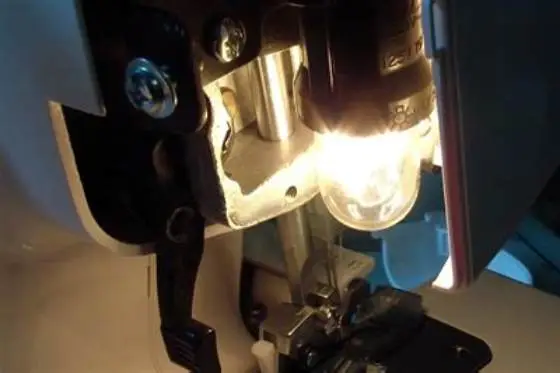
Make sure your sewing machine is plugged into a working outlet. You can test this by plugging in a lamp or other device. The machine’s power switch must be turned on; some models have a separate switch for the light or a dimmer control.
Not all sewing machine lights turn on automatically when the power is connected. Check your manual for the exact position of the light switch or dimmer. Sometimes turning the handwheel moves a switch connected to the light.
If the machine powers up but the light stays off, try the light switch several times to rule out a stuck or faulty switch. The brightness dial, if present, should also be checked by turning it fully on to see if the light responds.
How to tell a blown bulb vs failed LED board/strip
A traditional sewing machine bulb usually lasts between 100 and 250 hours under normal use. If the bulb filament is broken, it won’t light even if the switch is on and power is present. Bulbs often darken inside, showing a black spot. It helps to understand sewing machine bobbin winder not working before going further.
LED lights are becoming common as they last longer and use less power. A failed LED board or strip often shows no visible damage. The light may flicker or not come on at all, even if power is supplied.
To distinguish, first try replacing the bulb or LED with a known good one of the exact type. If the replacement works, you had a bulb failure. If not, suspect the LED board, wiring, or switch.
| Aspect | Bulb | LED board/strip |
|---|---|---|
| Visible damage | Blackened or broken filament | Usually no visible damage |
| Lifespan | 100-250 hours typical | Thousands of hours typical |
| Failure sign | No light, sometimes flicker before | No light or flickering |
| Replacement ease | Simple bulb swap | May require board replacement |
How to safely access, identify and replace the correct bulb/LED type (machine unplugged)
Always unplug the sewing machine before opening any covers to avoid electric shock. Locate the bulb housing: usually near the needle area or inside the machine’s light compartment. If that sounds like your situation, read up on machine foot pedal issue next.
Remove the cover using a screwdriver or by releasing clips, depending on your model. Identify the bulb type by looking at its shape, base, and voltage ratings printed on it or in your manual.
Common bulbs are small tubular or round bulbs in the 15-40 watt range at 110-120 volts AC or 220-240 volts AC, depending on your country. LED replacements operate on low voltage DC and may attach differently.
Insert the replacement bulb carefully, avoiding fingerprints on halogen bulbs as the oils can shorten life. Reassemble the cover securely before testing the light. For the detail, see our notes on fabric puckering when sewing.
- Unplug the sewing machine from the power source.
- Locate and remove the light cover or housing carefully.
- Note the bulb specifications on the bulb or manual.
- Remove the old bulb gently, avoiding breakage.
- Install the new bulb or LED of matching type and voltage.
- Replace the cover and plug in the machine to test.
This guide shows exactly how to isolate why your sewing machine light fails—power, switch or bulb—so you fix it safely and cheaply.
How to check the switch, wiring and fuse/board for power to the light
If the bulb or LED works in a tester but not in the machine, the problem lies in the switch, wiring or fuse. Checking these requires a multimeter, a tool that measures voltage and continuity.
First, with the machine unplugged, remove the housing to access the switch and wiring terminals. Check the switch for continuity by toggling it and testing with the meter. No continuity indicates a failed switch.
Inspect wiring for loose connections or visible damage. Some machines have a small fuse or circuit board protecting the light circuit. Check the fuse with the meter or visually for a broken filament.
If the wiring or fuse is at fault, repair or replacement requires care or professional service. Incorrect wiring or using wrong fuses can cause electric hazards or damage.
- Switch test: continuity on ‘on’ position, open on ‘off’
- Wiring test: check no breaks or corrosion
- Fuse test: continuity or visible intact filament
- Use the multimeter on lowest resistance setting
When to stop and get service instead of opening the housing
If you have tried replacing the bulb and confirming power and switch but the light still doesn’t work, it’s time to stop. Internal electronics or complex wiring faults require professional tools and skills.
Machines with LED boards or integrated light circuits can be damaged if opened incorrectly. Also, fuses or components inside the power board may need specific replacements only a technician can provide.
If you notice signs of burning, smell, or smoke, unplug immediately and do not attempt repairs yourself. Contact a qualified sewing machine service technician to avoid further damage or injury.
Regular maintenance and careful use extend light life. Avoid handling bulbs with bare hands and keep the area around the light clean from dust and lint.
Sewing machine light not working: bulb, switch or wiring?
Your sewing machine light often fails due to a burnt-out bulb or LED. Start by confirming power and that the light switch is on. Then test the bulb or LED replacement. If those check out, the switch or wiring is the issue.
Follow the order: power source, switch, bulb, then wiring. This saves time and avoids unnecessary repairs. Use a multimeter if you suspect switch or wiring faults but only if comfortable with electrical testing.
Replacing the bulb is usually a 5-15 minute job, requiring the machine to be unplugged and the correct bulb type. If the light still refuses to work after this, a service technician should diagnose internal electrical problems.
By checking these steps, you avoid costly service calls and keep your sewing projects bright and easy to see.
Most sewing machine light failures come down to the bulb or switch, which you can replace yourself safely.
Still wondering?
Can I replace a sewing machine bulb with any light bulb?
No. Sewing machines require bulbs with specific voltage and base type. Using incorrect bulbs risks damage or poor fit. Check your machine’s manual or the old bulb for exact specifications.
How do I know if my sewing machine light switch is faulty?
If toggling the switch does not turn the light on or off, or the multimeter shows no continuity when switched on, the switch may be faulty. Replacing the switch often restores function.
Why does my sewing machine light flicker sometimes?
Flickering usually indicates a loose bulb, poor contact, a failing bulb or switch, or wiring issues. Check the bulb socket and switch for secure connections first.
Is it safe to replace LED lights in my sewing machine?
Yes, if you use the correct type and voltage LED replacements. Always unplug the machine first and follow instructions carefully to avoid damage.
When should I stop trying to fix the light myself?
Stop if replacement bulbs don’t fix it, if you lack suitable tools, or if you see signs of burning or smell smoke. Seek professional service to avoid hazards.