Sewing-embroidery combo machines: what the hoop size rules out
A combo machine sews and embroiders from one unit, and the embroidery hoop size decides which projects fit. Check the specific machine's stated embroidery field on its spec sheet, since the field varies widely between entry models and higher-tier units.
On this page (10 sections)
- The short version
- What a combo machine is and how it swaps jobs
- What the switch actually costs you
- Singer SE300: hoop size and what it rules out
- Is the sewing side a real machine or a compromise
- How designs get loaded and what they cost for a Singer SE300 sewing and embroidery machine
- Stabiliser is not optional
- When two machines beat one combo unit
- What to check before buying a combo model
- Still wondering?
Part of our guide on embroidery machine for beginners
Key figures
- SE300 file formats
- Check the manual
- SE300 loading
- USB stick
- Design marketplaces
- Etsy, Design Bundles, EmbroideryDesigns.com
- Design cost
- A few dollars per file
- Bundles
- Cost less per file
The short version
- Check the stated embroidery field first: it decides what designs fit in one hooping.
- The sewing side is a real machine, but throat space on combos ranges widely and is often narrower than on dedicated quilters.
- Embroidery files usually load by USB stick or direct computer connection, not built-in designs alone.
- Two machines win when you want a wide hoop and a wide throat for the same budget.
- Designs, stabiliser, and embroidery thread each add cost on top of the machine price.
What a combo machine is and how it swaps jobs
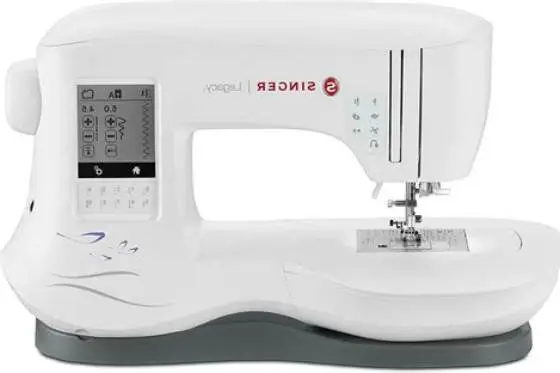
A sewing and embroidery combo machine is one unit with two modes. You sew normal seams in sewing mode. Then you switch to embroidery mode, and the machine follows a digital design, moving the hoop instead of you steering the fabric. The changeover is usually a menu setting, a different presser foot or embroidery arm, and a different bobbin thread.
Switching is mechanical. Most combos want the feed dogs dropped, the embroidery arm or carriage attached, and a special embroidery foot fitted. On many models you also remove the standard presser foot and slide the embroidery unit onto the free arm. That unit is the part that moves the hoop under the needle.
On many combo designs you must remove or disengage the embroidery unit to sew normally, so check your model's instructions. A real project flow means sewing first, embroidering second, then removing the arm to finish.
Designs load through the machine's screen from a USB stick, an SD card, or a direct cable to a computer. Some combos also hold built-in designs you can pick without a computer. Check which of those your model supports before you buy. A machine with no USB port leaves you choosing only from what it shipped with. If that sounds like your situation, read up on best small embroidery machine next.
- Embroidery mode: feed dogs down, hoop moves, machine follows the design file.
- Sewing mode: feed dogs up, you steer the fabric, standard stitches available.
What the switch actually costs you
The switch takes a minute or two, not seconds. Each changeover means re-threading, changing the foot, and re-hooping fabric. If your project alternates between seams and embroidery often, that time adds up across an afternoon.
Singer SE300: hoop size and what it rules out
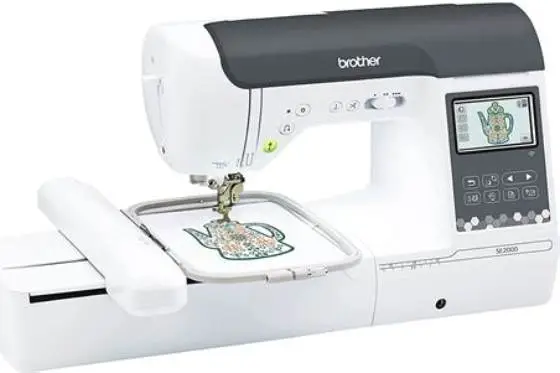
Check the SE300 manual or Singer's official product page for the hoops included with that model. Many home combos include at least one small and one mid-size hoop, but the exact contents vary by retail package. The small hoop covers monograms, small initials, baby bibs, collar points, and pocket motifs. The large hoop covers shirt-back logos and jacket panels. A single hooping will not fit full-width quilt borders unless the machine's largest hoop matches the border width. Check the hoop's stated embroidery field against your border measurement.
Hoop size is model-specific, not a fixed combo rule. Entry models offer a small field, mid-range models a larger one, and top-tier models a much wider field. You must look up the embroidery field on the spec sheet for the exact model you're considering. We go through choosing your first combo machine step by step elsewhere on the site.
Measure your target design before you shop. Many shirt-back designs run wide, so if you plan to stitch those, measure the actual design file you intend to use. You can split a large design into sections, but aligning the joins takes practice and rarely looks factory-clean on the first try. A test stitch on scrap shows whether the joins will hold before you commit to the real fabric.
The hoop is also the frame the fabric sits in. A bigger hoop holds more fabric weight, so the machine needs a stronger arm and steadier frame to move it accurately.
| Hoop field | Fits | Rules out |
|---|---|---|
| Small entry hoop | Monograms, small motifs, pockets | Shirt fronts, jacket backs, large blocks |
| Mid-size hoop | Shirt-front logos, medium applique | Jacket backs, wide borders |
| Large hoop | Larger logos, quilt blocks | Full-width quilt borders |
| Extra-large hoop | Jacket backs, tote panels | Only very large commercial work |

New brothread Cut Away Embroidery Stabilizer 15" x 25 Yd Roll
Stops knit and unstable fabrics moving for hooped embroidery by providing a 15"-wide cut-away stabiliser you can cut to fit most hoops.
Is the sewing side a real machine or a compromise
The sewing side of a combo is a genuine sewing machine. It runs straight stitch, zigzag, and typically a set of utility and decorative stitches, and it makes buttonholes. What it gives up against a dedicated sewing machine is usually throat space, the gap between the needle and the right side of the machine. The other half of this decision is calculating embroidery hoop size for 3 letter monogram.
Check the stated throat space, which on combos ranges widely and is often narrower than on dedicated quilters. Consult the SE300 spec sheet for the needle-to-tower distance. Compare that number to the dimensions you typically work with to decide if it meets your needs for garments, bags, or quilts. Rolling a large quilt through a narrower throat gets tiring. The maker states the throat figure on the spec sheet, so check that number against your largest quilt.
Straight stitch quality depends on feed and tension, not on the embroidery badge. A well-set combo sews a clean seam. Check whether the machine has adjustable presser foot pressure and a needle position you can shift. Those two settings carry most of a home sewist's fabric range.
Buttonholes come from the machine's own foot and setting. A combo with a one-step buttonhole foot gives consistent results. If the model only offers a four-step buttonhole, expect more practice to match lengths on a placket.
- one unit, one footprint
- sews garments and small quilts
- one set of accessories to store
- narrower throat than a dedicated quilter
- feed dog lever buried on some models
How designs get loaded and what they cost for a Singer SE300 sewing and embroidery machine
Embroidery designs are digital files that reach the machine from outside storage. The common route is a USB stick you plug into a port on the machine. A direct cable from a computer running the maker's software also works. Some models take an SD card instead. The machine reads the file and shows the design on its screen.
File format is the next hurdle. Home embroidery files come in several formats, and machines vary in which they accept. Check the SE300 manual for the file formats it supports, since format support differs by model. A design in a format your machine cannot read needs converting first, usually in the maker's software or a free converter. Check the format list in your manual rather than guessing.
Cost sits on top of the box price. Designs on marketplaces often range from free to paid. Many single designs are inexpensive, while bundles or club subscriptions may offer lower per-design cost, so check the vendor for current pricing. Membership clubs offer monthly access to design libraries for a monthly fee. Free designs exist from fabric shops and designer blogs, but quality varies.
Design size is tied to the hoop. A file built for a larger field will not fit a smaller hoop unless it can be scaled down. Scaling changes stitch density. Too dense and the fabric puckers or the needle breaks.
- Buy or download the design in a format your machine reads.
- Transfer it to a USB stick or connect the computer cable.
- Pick the design on the machine's screen and check its size against your hoop.
- Hoop the stabilised fabric, fit the embroidery foot, and start.
Stabiliser is not optional
Embroidery needs backing to stop the fabric moving and distorting. Tear-away suits stable wovens, cut-away suits knits that stretch, and wash-away suits towels and lace. Match the stabiliser to the fabric or the design will pucker.
When two machines beat one combo unit
Two machines win when you want a wide embroidery hoop and a wide sewing throat for the same money. A basic sewing machine plus a dedicated embroidery machine often covers both jobs better than one combo, because each is built around its own job.
The trade-off is space and setup. Two machines need two footprints and two power points, and you switch between them by walking across the room. A combo keeps everything in one place, which suits a small sewing room or someone who moves the machine to a table. A second machine also means a second manual to learn and a second set of feet and bobbins to store.
Buy the pair when your projects need a hoop larger than the combo's largest hoop, or when you quilt full-size tops. Buy the combo when you mostly sew garments and small quilts and want embroidery as an addition, not the main event.
There is a middle path worth naming. Keep a dependable basic sewing machine and add a dedicated embroidery machine later, once you know embroidery is a keeper. That spreads the cost and avoids paying for an embroidery arm you rarely use.
- each machine built for its job
- sew while a design stitches separately
- two purchases, two footprints
- more cables and storage
- higher total cost than one combo
What to check before buying a combo model
Check the hoop first. Find the machine's stated embroidery field on the spec sheet, and confirm it covers your largest planned design at full size. If the largest hoop is smaller than your design, you will re-hoop or split the file.
Check the throat next. Look for the distance from the needle to the machine's right side, stated in inches or centimetres. Compare it to your widest quilt roll. If you quilt anything above a lap size, this number decides whether the machine is pleasant or punishing.
Check how designs load. Confirm whether the model takes a USB stick, an SD card, or a cable, and which file formats it reads. A machine with no external port limits you to its built-in designs, which get old fast.
Check the sewing side as a machine in its own right. Look for adjustable presser foot pressure, a one-step buttonhole, and a needle threader. Then ask what comes in the box. Feet, hoops, and a dust cover are the parts you would otherwise buy separately. A machine that ships with both hoops saves you a separate hoop purchase later.
| Spec | Where to find it | Why it decides |
|---|---|---|
| Embroidery field | Spec sheet, in inches | Sets your largest design |
| Throat space | Spec sheet, in inches | Sets your largest quilt roll |
| Loading method | Manual or port list | Sets where designs come from |
| File formats | Manual | Sets which designs run |
| Presser foot pressure | Feature list | Sets fabric range for sewing |

New brothread 25pcs Size A SA156 Prewound Bobbin Thread -White
Gives you prewound 60WT bobbins compatible with Singer embroidery machines (Size A SA156), so you get bobbin thread already on bobbins that fit your model.
Buy a combo if your largest design fits and you mainly sew garments and small quilts. Otherwise buy a basic sewing machine and a dedicated embroidery machine.
Still wondering?
Can the Singer SE300 embroider a shirt back?
Yes, with the large hoop. The SE300 ships with a large hoop that covers most shirt-back designs. The small hoop cannot fit one, so check the design size against the hoop before you buy.
Do I need a computer to embroider on a combo?
Not always. Many combos hold built-in designs you can pick on the screen, and a USB stick moves bought designs across without a computer. A computer helps for buying, resizing, and converting files between formats.
Will the sewing side handle quilting?
For lap quilts and smaller, yes, if the throat space suits. Full-size tops get hard to roll through a narrower throat. Singer states the SE300's sewing space on its spec sheet. Check the stated throat figure against your largest quilt before you commit.
How much do embroidery designs cost?
Single designs on marketplaces like Etsy and EmbroideryDesigns.com usually sell for a few dollars per file. Buying a bundle works out cheaper per file. Membership clubs offer monthly access for a monthly fee. Free designs exist from shops and designers, with varying quality.
Is one combo cheaper than two machines?
One combo usually costs less than a basic sewing machine plus a dedicated embroidery machine of similar quality. Two machines often give a larger hoop and throat, so the extra spend buys capability rather than just a second unit.
What thread and needle suit machine embroidery?
A common starting point is embroidery-weight thread (often 40 wt) and a machine embroidery needle. Check your machine manual for the manufacturer's recommendation. Change the needle when it snags or the stitches pucker.