Epic 2 vs Epic 95Q: what you actually get for the upgrade
Your Epic 95Q already sews like an Epic 2. Husqvarna Viking lists both machines on the same sewing platform, with the same screen, WiFi and work area. Only the Epic 2 embroiders, with hoops in the box. Choose the Epic 2 only when embroidery is part of your sewing.
On this page (9 sections)
- Fit check
- The short version
- What the Epic 95Q gives you: the full sewing and quilting machine
- Epic 2 vs Epic 95Q: the upgrade adds embroidery, and little else
- Known Epic 2 problems and how to fix them
- Firmware updates: Epic 2 vs Epic 1 and how to get them
- Where to find Epic 2 and Epic 95Q manuals and tutorials
- Which machine fits your sewing: quilter vs embroiderer
- Still wondering?
Part of our guide on sewing machine for beginners

EPIC 2 Sewing & Embroidery Machine by HUSQVARNA VIKING
This is the sewing-and-embroidery model with the embroidery unit in the box, so the large-hoop monogramming
Check it on Amazon
EPIC 95Q Sewing Machine by HUSQVARNA VIKING
If you decide you will not embroider, this is the same maker's sewing-only machine and you skip the
See the budget option| Product | embroidery module included | Verdict | |
|---|---|---|---|
| EPIC 2 Sewing & Embroidery Machine by HUSQVARNA VIKING Husqvarna Viking | Page presents it as a sewing & embroidery machine (embroidery unit included = yes); no hoop dimensions are printed here, so 360 x 260 mm cannot be checked off this page. | Embroidery unit included | View on Amazon |
| EPIC 95Q Sewing Machine by HUSQVARNA VIKING Husqvarna Viking | Sewing-only machine: no embroidery unit and no hoop of any size, against a 360 x 260 mm embroidery requirement. | Sewing-only, no embroidery | View on Amazon |
Key figures
- Embroidery
- Epic 2 only
- Built-in stitches
- Over 840 (both)
- Touchscreen
- 10.1 inches (both)
- Work area
- Over 12 in (310mm)
- Largest included hoop
- Three hoops included
- WiFi and updates
- Both machines
The short version
- Shared platform: the same stitches, screen, WiFi and feed system on both machines.
- Embroidery alone separates them: the Epic 2 adds a unit, hoops and a large built-in design library.
- Hoop sizes: several hoops come in the box, with a larger optional hoop for bigger designs.
- Wireless updates and on-screen tutorials come with both machines, not just the Epic 2.
- Skip the Epic 2 unless embroidery sits in your plans; the 95Q sews the same seam for less.
What the Epic 95Q gives you: the full sewing and quilting machine
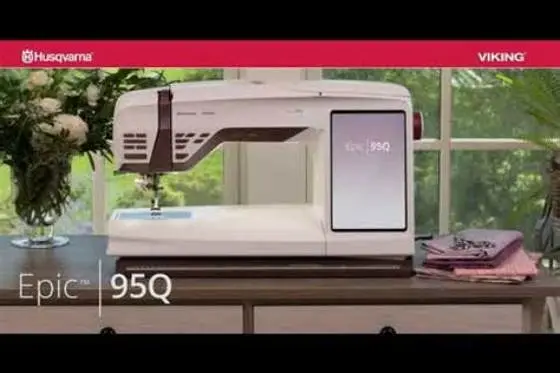
Husqvarna Viking built the Epic 95Q as a sewing-only machine on the same platform as the Epic 2. Hundreds of built-in stitches sit behind a large capacitive touchscreen, with Integrated Dual Feed (IDF) on both machines. IDF feeds fabric from the top and bottom, so layered seams stay even. WiFi connects the 95Q to the mySewnet cloud for wireless updates, free designs and the maker's blog. Nothing about the sewing side is cut down.
Quilting room matches the Epic 2 exactly. Room is wide enough for rolling a king-size quilt, and the bulk passes under the head without a fight. Laser guidance projects a line on the fabric, so rows of quilting stay even without marking every pass.
Thick seams get the same treatment on both machines. Electronic needle piercing power drives the needle through denim and canvas, and the wider feed teeth keep layers moving together. Start with a fresh 100/16 jeans needle for denim, or a 100/16 leather needle for vinyl. Pair it with 40-weight polyester for topstitching. Change the needle after a long denim session, sooner if stitches start skipping.
Accessories in the box cover quilting from day one. Feet for the IDF system, a quarter-inch foot, a sensor buttonhole foot and a Sensor Q-Foot come with the machine. Before you commit to anything, it is worth looking at embroidery machines under $1000.
Epic 2 vs Epic 95Q: the upgrade adds embroidery, and little else
Embroidery is the whole upgrade. Designer Epic 2 ships with an embroidery unit and several hoops in the box. Bigger designs take an optional larger hoop, and the maker's accessory page lists every size. Built-in designs come loaded in a large library, including cutwork and ribbon techniques. Ribbon embroidery needs an optional attachment, and the machine guides ribbon down in embroidery mode. Hoops in the box cover small labels up to large jacket backs.
Designs travel to the machine two ways. WiFi sends them from the mySewnet library straight to the touchscreen, or a USB stick carries them across. Jump stitches get trimmed on their own. Phone photos through the mySewMonitor app place a design exactly where you want it on hooped fabric. Designs from the library download straight to the screen, ready to stitch without a computer in the loop.
Everything else on the two machines matches. Stitch counts, screens, WiFi, JoyOS ADVISOR tutorials, laser guidance and IDF are identical. Alphabet selection differs slightly between the two, per the manuals. Monogram fans notice the alphabet gap first, and nobody else will. Paying for the Epic 2 buys embroidery hardware, not a better sewing machine. It helps to understand 4x4 embroidery sewing combo before going further.
| Feature | Epic 95Q | Designer Epic 2 |
|---|---|---|
| Embroidery unit | None | Included with hoops |
| Largest included hoop | None | 360 x 260mm |
| Built-in embroidery designs | None | Large library |
| Touchscreen | 10.1 in, capacitive | Same |
| WiFi and mySewnet | Yes | Same |
| Built-in stitches | Over 840 | Same |
| Work area | Over 12 in (310mm) | Same |
| Integrated Dual Feed | Yes | Same |
EPIC 2 Sewing & Embroidery Machine by HUSQVARNA VIKING
This is the sewing-and-embroidery model with the embroidery unit in the box, so the large-hoop monogramming and applique work the sewing-only machines cannot do is open to you from day one.
- Height 13.1 inches
- Length 23.3 inches
- Weight 33.0 pounds
Known Epic 2 problems and how to fix them
If a screen freezes, hold the power button until the machine shuts down, wait a few seconds, then switch it back on. Settings survive a restart, so nothing needs setting up again. Check for a firmware update after the restart: makers ship fixes for exactly this kind of glitch.
Tension drifts after an update or a thread change. Bobbin thread showing on top means the top tension needs a look, and top thread pulling through means the bobbin side does. Re-thread with the presser foot up so thread seats in the discs, then sew a test seam on scrap. Fresh needles fix more tension complaints than any setting does.
Signals drop when the machine sits far from the router. Move the machine closer, or download designs to a USB stick and carry them over. Design files travel fine on a stick, and sewing never needs a connection at all. Weak signals waste more time than the stick ever will.
When the hoop alignment seems off, recalibrate the embroidery unit from the settings menu and let the machine find home position again. Stitch a small test design on scrap before committing to a garment.
- Frozen screen: hold power until shutdown, restart, then update firmware.
- Drifting tension: re-thread with the foot up and test on scrap.
- Dropped connection: move closer to the router or use a USB stick.
- Misaligned hoop: recalibrate from embroidery settings before stitching.
EPIC 95Q Sewing Machine by HUSQVARNA VIKING
If you decide you will not embroider, this is the same maker's sewing-only machine and you skip the embroidery unit entirely — but nothing on this page confirms the 9 mm stitch width, dual feed or 12-inch work area.
- Length 28.7 inches
- Weight 48.5 pounds
- Width 16.9 inches
Both machines share the same screen, the same stitches and the same WiFi, so the upgrade price buys one thing: embroidery.
Firmware updates: Epic 2 vs Epic 1 and how to get them
Wireless updates keep the Epic 2 current without a computer in the loop. Check for updates from the machine settings and install them over WiFi when one appears. Files also come from the maker's support site on a USB stick, which suits anyone with patchy WiFi. Either route installs the same update.
Generational changes run deeper than updates. Decorative stitches grew wider, the stitch count rose, and laser guidance, IDF and the ribbon embroidery attachment arrived with it. Needle positions and built-in designs grew too, per the maker's comparison page. An Epic 1 still handles the same size of project.
Update files never cross between generations. Each machine takes only the file labelled for its own model. Read the label before downloading, and keep the machine plugged in while an update runs.
Support for the Epic 1 still exists, but new features stop at the Epic 2. Makers move development forward, and the Epic 1 misses the mySewnet library, laser pictograms and ribbon work. Used Epic 1 machines in good order still sew beautifully, so price decides whether the older machine earns a place. Test every function before paying, embroidery unit included.
Where to find Epic 2 and Epic 95Q manuals and tutorials
Both machines carry their manuals on board. JoyOS ADVISOR opens the user's guide from the touchscreen, alongside interactive tutorials for collars, zippers, hems and exclusive stitch techniques. Sewing instructions walk through full projects and load the right stitch for each step. No paper manual hunt needed when the guide lives in the machine.
Printed copies still exist for readers who like paper. Quick-start guides ship in the box, and full manuals download as PDFs from the maker's support site. Search by model name, pick your language, and save the file where you can find it again. Keep the PDF on your phone: the machine screen shows the guide, but a phone stays readable with the machine switched off.
Video help streams straight to the screen. Free projects, stitches and technique videos stream to both machines over WiFi from the mySewnet cloud. Built-in tutorials cover collars, hems, zippers and the exclusive stitch techniques. Work through one technique at a time, then practise it before moving on.
Signing up unlocks the extras. Registration links the machine to design libraries, apps and the blog through a free mySewnet cloud account. Registering the 95Q still pays: wireless updates and the blog feed arrive without any extra effort.
Which machine fits your sewing: quilter vs embroiderer
Quilters and garment sewists should look hard at the 95Q. Same stitches and feed system as the Epic 2, without paying for embroidery hardware. Availability varies by dealer, so confirm current stock with a local dealer before buying. Inspect the screen, test every stitch mode, and run the feed dogs through their paces before paying.
Wanting embroidery changes the maths completely. Hoops, designs and the unit itself come only with the Epic 2. Reselling a 95Q to fund an Epic 2 costs more than buying the Epic 2 first. Buy the Epic 2 when embroidery sits in your plans for the coming year, even as a maybe.
Production embroidery still has limits. Included hoops cover quilt labels, tote panels and jacket backs. Anything wider than the largest hoop needs a bigger machine or a split design. Volume work suits a multi-needle machine better than a single-needle one.
Heavy fabric work stays identical on both machines. Denim and canvas pass through IDF, with electronic needle power driving each stitch. Stock jeans needles in 90/14 and 100/16, with a heavier thread on top than in the bobbin for topstitching.
- Sewing-only buyers: sewists and quilters who skip embroidery, same sewing for less.
- Embroiderers: anyone who embroiders now or within a year.
- Both machines: identical sewing, same screen, same WiFi.
- Used buyers: test the screen, embroidery unit and every stitch mode first.
Still wondering?
Can I add embroidery to the Epic 95Q later?
No. The 95Q is a sewing-only machine, and no embroidery unit fits it. Deciding before you buy usually costs less than a resale-and-upgrade path, so weigh embroidery plans first.
What changed between the Designer Epic 1 and Epic 2?
Stitches grew wider and more numerous. New hardware arrived with it: laser guidance, Integrated Dual Feed and the ribbon embroidery attachment, plus the mySewnet design library on screen. Needle positions and built-in designs grew as well.
Does the Epic 2 require WiFi to work?
Not at all. Sewing, quilting and embroidery all run without an internet connection. Connections only download designs, stream tutorials and deliver wireless updates. USB sticks carry designs and update files when WiFi is patchy or switched off.
How do I fix skipped stitches on heavy fabric with the Epic 2 or 95Q?
Fit a fresh needle first: a 100/16 or 110/18 jeans needle for denim or canvas. Lift the presser foot and thread again, so the thread seats properly in the tension discs. Slow down to half speed and check the thread weight: 50-weight polyester suits heavy seams better than lightweight cotton. Persistent skipping after those steps points to a bent needle or a service visit.
Where do I buy a used Designer Epic 2?
Begin with a local dealer: many take trade-ins and sell serviced machines with a short warranty. Look on Facebook Marketplace, Craigslist and eBay for the model name, and filter by distance to avoid shipping a heavy machine across the country. Ask for the serial number and call the maker to confirm warranty status before paying.